This guide helps you decide if the Dell GJKNX 68Wh internal battery is the right replacement for your Latitude/Precision—by verifying your exact model, matching the battery part number, checking the storage bay fit (M.2-only vs 2.5″ drive), and then installing and calibrating safely.
Buy the Dell GJKNX 68Wh Battery
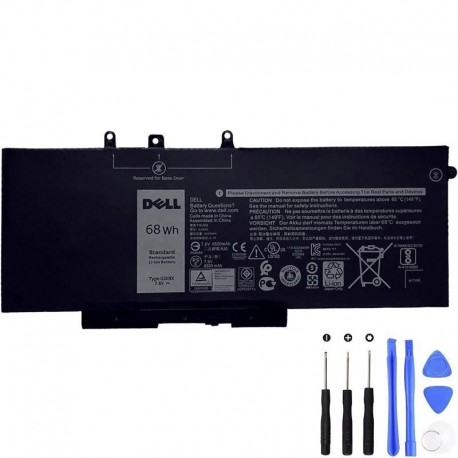
Step 1 — Confirm your exact Dell model
Open Settings > About or check the label on the bottom cover for your precise model. The official 68Wh GJKNX battery is designed for the following families: Latitude 5280, 5290, 5480, 5490, 5491, 5495, 5580, 5590, 5591 and Precision 3520, 3530. If you’re not in these families, stop here.
Step 2 — Match your battery’s part number
Power off, remove the base cover, and read the label on your old battery. Look for GJKNX or common aliases such as 5YHR4, GD1JP, FPT1C, KCM82, MT31P. You may also see the Dell commercial part 451-BBZG listed by retailers. A match indicates you’re in the right 68Wh family.
Step 3 — Will the 68Wh pack physically fit?
The 68Wh battery is the “long” pack. On some systems—most notably Latitude 5580 (and configurations of 5280/5480)—it is compatible only when your laptop uses an M.2 SSD. If your machine still has a 2.5″ HDD/SSD bay populated, the long 68Wh pack can conflict with that bay and won’t fit. Choose a 3-cell battery instead (see next step) or move to M.2 storage.
Step 4 — 68Wh vs 51Wh / 42Wh: which should you buy?
- Choose 68Wh (this page) for maximum runtime—provided your configuration allows it (often M.2-only on 5280/5480/5580).
- Choose 3-cell alternatives (commonly 51Wh or 42Wh) if your system uses a 2.5″ drive. Distributors explicitly note 5280/5480/5580 with 2.5″ storage should use a 3-cell battery (e.g., 451-BBZT variants).
Key specs (at a glance)
- Capacity: 68Wh
- Voltage: 7.6V
- Chemistry: Li-ion, 4-cell
- Family: GJKNX (see P/N list below)
Specs per Dell’s official listing.
Install safely (5-minute overview)
- Shut down the laptop, unplug AC, and discharge residual power (hold the power button ~15s).
- Remove the base cover (screw count/size vary by model).
- Disconnect the battery cable, loosen the battery’s captive screw(s), lift the pack out.
- Seat the new pack, tighten the screw(s), reconnect the cable, reinstall the base cover.
- Power on and check battery info in BIOS/SupportAssist.
Reference service guides: Latitude 5591 removal/installation steps (very similar to 5480/5490) and official CRU guides for 5490.
After install: calibration & health
- Do one calibration cycle: charge to 100% → rest 20–30 min → use down to ~10–15% → recharge to 100%.
- Follow Dell’s Lithium-ion precautions (avoid heat/pressure, do not bend or puncture). If the pack appears swollen, stop using it and contact support.
Official compatibility families
Per Dell’s product page for part 451-BBZG (the official 68Wh kit), this pack is designed for: Latitude 5280, 5290, 5480, 5490, 5491, 5495, 5580, 5590, 5591; Precision 3520, 3530.
Common part numbers (P/N) in the 68Wh GJKNX family
You may find one or more of these on the label or in retailer listings; they indicate the same 68Wh long battery family:
- GJKNX (type)
- 5YHR4, GD1JP, FPT1C, KCM82, MT31P (often also shown with a leading “0”, e.g., 0GD1JP)
- 451-BBZG (Dell’s commercial/retail kit reference)
Examples from reputable distributors and listings.
FAQ
Q1. Can I upgrade from 42Wh/51Wh to 68Wh?
Yes—if your configuration allows it. Systems with a 2.5″ drive generally cannot fit the long 68Wh battery; they use 3-cell packs. If your bay is M.2-only, the 68Wh pack is typically supported on the listed Latitude/Precision families.
Q2. What if my Dell is Inspiron 15 3583?
Use the WDX0R 42Wh family for that model, not GJKNX.
Q3. What are the official specs again?
68Wh, 7.6V, 4-cell Li-ion; designed for Latitude 5280/5290/5480/5490/5491/5495/5580/5590/5591 and Precision 3520/3530.