Your HP Envy or Pavilion x360 is shutting down early, stuck at low capacity, or the battery icon won’t calibrate? This step-by-step buying guide helps you confirm compatibility, understand key specs, and complete checkout confidently for the HP LK03XL 52.5Wh battery.
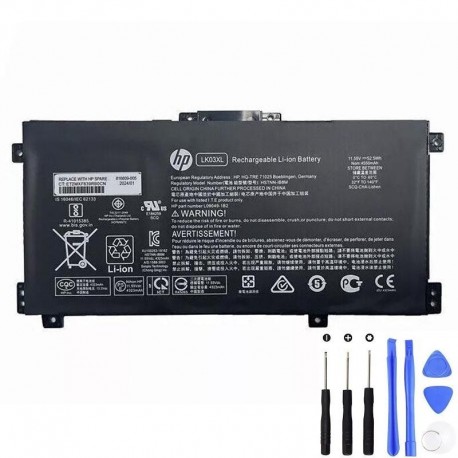
Who this battery is for
- Owners of HP Envy 17 / Envy x360 15 and HP Pavilion x360 15 families listed below.
- Users experiencing rapid percentage drops, unexpected shutdowns, or inconsistent calibration.
- Anyone whose original pack is worn or swollen and needs a safe, like-for-like replacement.
Step 1 — Quick health checks before you shop
- Generate a Windows battery report: Run
powercfg /batteryreport(Admin), compare Full Charge Capacity vs. Design Capacity. - Look for physical signs: Lifting touchpad, unlevel base, or heat while charging points to replacement time. Stop using a swollen pack.
- Rule out the charger: If the laptop works fine on AC but dies off-plug, the battery is the bottleneck.
Step 2 — Confirm compatibility (most important)
Match either a battery part number (P/N) on your old pack or your exact laptop series below.
✔ Compatible Battery Part Numbers
- HP LK03XL (52.5Wh)
- HP 916368-421, 916368-541, 916814-855
- HP HSTNN-IB8M, HSTNN-IB8V, HSTNN-LB7U, HSTNN-LB8J
- HP L09049-1B1, L09049-1B2, L09280-855, L09281-855, L09911-1B1
- HP LK03, LK03055XL-PR
- Platforms: TPN-132, TPN-I129, TPN-W127, TPN-W128
✔ Compatible Laptop Families (highlights)
- HP Envy 17: 17-ae000s, 17-ae100s, 17-bw0000s/0100s/0200s/0300s, 17-ce0000s/ce1000s, 17t-ae100s, 17t-ce000s
- HP Envy x360 15: 15-bp000s/bp100s, 15-bq000s/bq100s/bq200s, 15-cn0000s/0100s/0200s/0300s/0400s/0700s/0800s/1000s/1600s/1800s, 15-cp0000s/cp0800s, 15m-bp000s, 15m-bq000s, 15m-cn0000s, 15m-cp0000s, 15z-bq100 CTO/s
- HP Pavilion x360 15: 15-cr0000s/cr0100s/cr0200s/cr0300s/cr0400s/cr0900s
Tip: Your model string is on the bottom cover (e.g., 15-cn1000). If you see it above—or your battery P/N matches—you’re good to go. Still unsure? Use the product page to ask support to confirm before ordering.
Step 3 — Key specs that actually matter
- Capacity: 52.5Wh — the correct energy headroom for the listed Envy/Pavilion x360 families.
- Chemistry & protection: Li-ion cells with smart BMS and safeguards: over-charge, over-current, over-temp, and short-circuit.
- Form-fit: Purpose-built for LK03XL bay; no firmware mods needed.
Step 4 — What’s in the box
- 1 × HP LK03XL 52.5Wh replacement battery
- Protective packaging and ESD-safe handling
- Online support for installation & first-charge calibration
Step 5 — Installation overview (15–30 minutes)
- Power down, unplug, and hold the power button for 15 seconds to discharge.
- Remove bottom cover: Phillips or Torx screws (track their positions), pry gently with a plastic tool.
- Disconnect battery cable first, then remove battery screws.
- Install the new pack, route the cable cleanly, and reconnect firmly.
- Reassemble and perform a calibration cycle: charge to 100% → rest 1–2 hours → discharge to 5–10% → charge back to 100% uninterrupted.
Safety note: If the old pack is swollen, avoid pressure or puncture. Store in a fire-safe area and dispose via local e-waste programs.
Step 6 — Checkout & delivery tips
- Address & contact: Provide a reachable address (and phone) to avoid delivery delays.
- Payment: Use a billing address that matches your bank/issuer to prevent authorization holds.
- Warranty & returns: Review store policies on the product/returns pages before purchase for peace of mind.
FAQs
Will 52.5Wh improve runtime?
Yes—if your current pack is degraded, replacing it with a fresh 52.5Wh unit restores the intended endurance for these HP families.
Do I need drivers or BIOS updates?
No special software is required; Windows will recognize the battery automatically. A calibration cycle is recommended after installation.
Is LK03XL interchangeable with other HP series?
Compatibility is specific. Use the P/Ns and model list above. When in doubt, contact support on the product page with your exact model number.
How to order in 3 steps
- Match your original P/N (e.g., LK03XL, 916814-855, L09280-855) or your exact model (e.g., Envy x360 15-cn1000s).
- Open the product page below and add to cart.
- Complete checkout; keep the confirmation email for tracking and warranty.