This page is engineered to answer every query behind the search “hp spare l11119-855”: meaning, specs, fast compatibility check, installation tips, and a ready-to-order UK link. Use the steps below to buy with confidence.
- L11119-855 = HP Spare code. It commonly maps to the HT03XL battery family (3-cell, ~11.4–11.55V, ~41Wh).
- Verify by reading your original label. If it shows L11119-855 / HT03XL, you’re in the right place.
- Buy the UK-stocked replacement here:
Buy HT03XL (L11119-855) Battery
What does HP Spare L11119-855 mean?
L11119-855 is the spare part code printed on many HP battery labels. For this family, you will usually see the series code HT03XL printed on the same pack. Retailers and forums therefore refer to the same battery as “HP Spare L11119-855” or “HT03XL battery”. When replacing, match codes, voltage and connector.
Key specifications & how to match (L11119-855 / HT03XL)
| Battery family | HT03XL (commonly labelled with HP Spare L11119-855) |
|---|---|
| Voltage | Nominal 11.4–11.55V (3-cell, Li-ion) |
| Capacity | ~41–42Wh (e.g., 41.04Wh on the recommended listing) |
| Form factor | Internal pack; board connector (match position/orientation to photos) |
| Good to know | Small Wh differences within the same family are normal. Prioritise voltage + outline + connector layout. |
Recommended product: HT03XL 41.04Wh (compatible with HP Spare L11119-855)
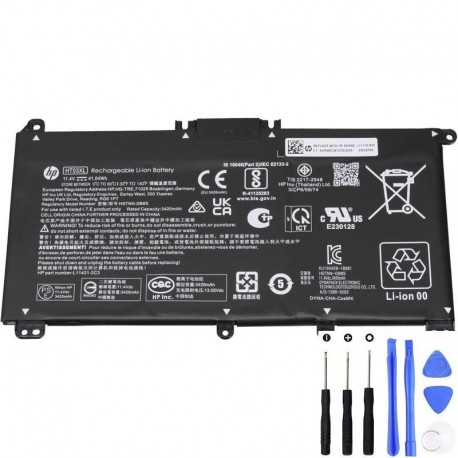
Buy HT03XL (L11119-855) Battery — UK
Browse all laptop batteries
Before checkout, confirm: your old label shows L11119-855 and the connector outline matches the product photos.
Compatible families & example models
This spare appears widely across HP Pavilion lines. Below are examples to help you recognise the chassis family (not a full list). Always confirm by reading your original label.
14-ce, 14-ce1xxx/ce3xxx • 14-dh (x360) • selected 14-dk
Many 14-inch slim and x360 variants share the HT03XL bay.
15-cs / 15-cs3xxx • 15-dw • some 15-da / 15-db
Check sub-codes (e.g., 15-cs2000na vs 15-cs3000sa) in the maintenance manual.
Multiple 14-dh configurations (x360 convertible)
4-step compatibility check (≈ 3 minutes)
- Confirm it’s the battery: Win + X → Windows Terminal (Admin) → run
powercfg /batteryreport. If Full Charge Capacity is much lower than Design Capacity, the pack is tired. - Read the code on your pack: Shut down, unplug, remove the bottom cover carefully. Photograph the label. Look for L11119-855 and/or HT03XL.
- Match the outline: Check the product photos: screw posts and connector position/orientation should mirror your original.
- Buy from a UK seller with clear warranty: Open the listing above and verify details before paying.
Installation & first-charge tips
- First charge to 100% normally; no deep “calibration” is required for modern Li-ion.
- Update BIOS/firmware if HP recommends it for your exact model to improve charge management.
If it still shows “Plugged in, not charging”
- Charger/DC-jack: Try a known-good adapter; inspect the jack for play.
- Firmware: Run HP Support Assistant / Windows Update; install power-related updates.
- Reset EC: Shut down, unplug, hold the power button 15–20 s; then reconnect and test.
- Battery health: Re-run
powercfg /batteryreport. If Full Charge Capacity is still extremely low, contact support with your report.
Care & lifespan: get the most from your HT03XL (L11119-855)
- Avoid sustained heat (blocked vents, heavy loads on soft surfaces).
- For desk use, aim for moderate charge levels (40–80%) when possible.
- Store long-term at ~50% in a cool, dry place; top up every 2–3 months.
- Expect 300–500 full cycles before noticeable capacity loss (usage-dependent).
FAQs (short, scannable answers)
Is HP Spare L11119-855 the same as HT03XL?
They refer to the same battery family: HT03XL packs typically carry the HP Spare L11119-855 code. Always match voltage and connector.
Which laptops use L11119-855?
Commonly Pavilion 14 (14-ce/14-dh x360) and Pavilion 15 (15-cs/15-dw) families. Confirm by reading your battery label.
Can I buy a higher Wh version?
Yes, minor Wh differences inside the same HT03XL family are fine if voltage + outline + connector match.
Is “Plugged in, not charging” always a dead battery?
No. Check charger, DC-jack and firmware. Use powercfg /batteryreport to verify health.
Where to buy in the UK?
AdapterFamily UK — HT03XL (L11119-855) 41.04Wh. Compare photos, voltage and connector before checkout.
Match the label on your pack (L11119-855 / HT03XL), confirm voltage and connector, then order below.
Buy HT03XL (L11119-855) Battery — UK
Need a different HP battery? See all laptop batteries.