Trying to buy the right replacement for HP Spare L11119-855? This definitive guide explains what the code means, how it relates to HT03XL, how to double-check compatibility, and how to install the new battery safely—written for UK buyers and linked to a ready-to-order product.
What does HP Spare L11119-855 mean?
L11119-855 is an HP “Spare” code printed on the battery label. It typically appears on internal 3-cell lithium-ion packs also marked HT03XL. In simple terms, L11119-855 = the spare part number and HT03XL = the battery family/series commonly used by retailers.
Specs at a glance for HP Spare L11119-855 (HT03XL)
| Battery family | HT03XL (commonly paired with HP Spare L11119-855) |
|---|---|
| Voltage | Nominal 11.4–11.55V (3-cell series) |
| Capacity | ≈ 41–42Wh (e.g., 41.04Wh); typical 3400–3630mAh |
| Chemistry | Li-ion, internal pack |
| Connector | Board connector (match position/orientation to photos) |
| Colour | Black |
Markings can vary by batch. Always prioritise voltage, form factor, and connector layout when confirming a match.
Recommended product: HT03XL 41.04Wh (compatible with HP Spare L11119-855)
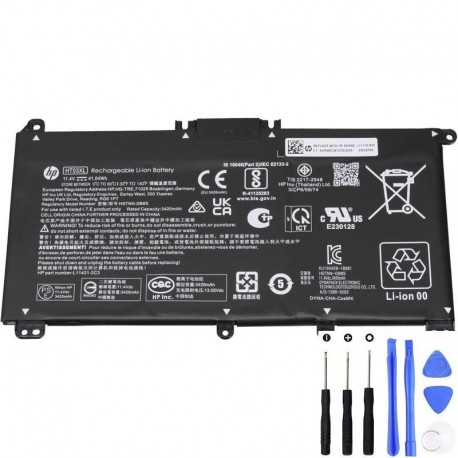
To purchase, open the product page and verify that your on-pack code (L11119-855) and voltage match.
Buy HT03XL (L11119-855) Battery
All references to L11119-855/HT03XL are for compatibility identification. Always compare photos and specifications to your original battery.
Which laptops use L11119-855? (Examples)
This spare appears widely across HP Pavilion lines. Below are examples—not a full list. Because HP reuses chassis, always check your label.
Check your maintenance manual for battery part numbers.
Important: Exact compatibility depends on model sub-code (e.g., 15-cs2000na vs 15-cs3000sa). The safest method is to match the printed code on your existing battery: HP Spare L11119-855.
4-step check to confirm compatibility (≈3 minutes)
- Generate a battery health report (Windows): Press Win + X → Windows Terminal (Admin) → run
powercfg /batteryreport. If Full Charge Capacity is far below Design Capacity, a replacement will help. - Read your battery’s label: Shut down, unplug, and carefully remove the bottom cover. Look for L11119-855 and/or HT03XL. Take a clear photo.
- Match voltage & outline: Confirm 11.4–11.55V and that the connector location/orientation and screw points match the product photos.
- Order with confidence: Open the product link above and check warranty, returns and delivery details.
Installation tips (safe & simple)
- Power off, unplug the charger, and hold the power button for 10 seconds to discharge.
- Use the correct screwdriver bits to avoid stripping screws; keep them labelled by position.
- Lift the old battery gently—avoid pulling on the cable. Re-seat the new battery connector firmly.
- Reassemble the cover. First charge to 100% normally; no deep “calibration” cycles required for modern Li-ion.
Tip: Update BIOS/firmware if HP recommends it for your model. It can improve charge management.
FAQs
Is L11119-855 the same as HT03XL?
Most packs labelled HT03XL also carry L11119-855 as the HP Spare code. Treat them as part of the same battery family but still match voltage and connector layout.
Can I use a higher Wh version?
Within the same family and chassis, some variants offer slightly different Wh (for example, 41.04Wh). If a listing shows your spare code and your laptop model, higher Wh typically gives longer runtime.
What if my laptop says “Plugged in, not charging”?
It could be the battery, the charger, or firmware. Run the Windows battery report, check HP Support Assistant for updates, and inspect the DC jack. If Full Charge Capacity is far below Design Capacity, replace the battery.
Original vs compatible—what should I buy?
Choose a reputable seller with clear listings, warranty, and UK returns. Whether original or compatible, the product should match voltage, fit your chassis, and specify L11119-855/HT03XL.
Search by the exact code on your label (L11119-855 / HT03XL) and compare voltage and connector layout to the product photos.
Buy HT03XL (L11119-855) Battery on AdapterFamily UK
UK tip: look for VAT-inclusive pricing, clear delivery times, and a minimum 12-month warranty.