ASUS V16 (V3607) Buyer’s Guide – Five Configurations Explained
The ASUS V16 (V3607) is a 16-inch performance laptop that ships in five variants — V3607VU, V3607VJ, V3607VH, V3607VM and V3607VP.
They share the same solid chassis, ports and battery, but differ in CPU/GPU and display options. This guide compares them,
answers the questions shoppers actually ask, and closes with reliable replacement parts (battery & 150W charger) for long-term ownership.
16.0″ 16:10
WUXGA 144Hz or 2.5K 144Hz
Intel® Core™ 210H / 240H / 13420H / 13620H / 270H
RTX 3050 / 4050 / 5050 / 5060 / 5070 (varies)
DDR5 up to 32GB
PCIe 4.0 SSD (512GB–1TB)
63Wh 3-cell
150W AC adapter
MIL-STD-810H
Wi-Fi 6 + BT 5.3
What’s the difference between V3607VU / VJ / VH / VM / VP?
| Model | CPU options | GPU options | Display options | Memory / Storage |
|---|---|---|---|---|
| V3607VU | Core™ 5 210H | RTX™ 4050 6GB or Intel® Graphics | 16″ WUXGA (1920×1200) 144Hz, 300 nits | DDR5 up to 32GB / PCIe 4.0 SSD 512GB–1TB |
| V3607VJ | Core™ 7 240H | RTX™ 3050 6GB or Intel® Graphics | 16″ WUXGA 144Hz | DDR5 up to 32GB / PCIe 4.0 SSD 512GB–1TB |
| V3607VH | Core™ i7-13620H | RTX™ 5050 8GB or Intel® Graphics | 16″ WUXGA 144Hz or 16″ 2.5K (2560×1600) 144Hz, 400 nits, 100% Adobe | DDR5 up to 32GB / PCIe 4.0 SSD 512GB–1TB |
| V3607VM | Core™ i5-13420H | RTX™ 5060 8GB or Intel® Graphics | 16″ WUXGA 144Hz | DDR5 up to 32GB / PCIe 4.0 SSD 512GB–1TB |
| V3607VP | Core™ 9 270H | RTX™ 5070 8GB | 16″ 2.5K 144Hz, 400 nits, 100% Adobe | DDR5 up to 32GB / PCIe 4.0 SSD 512GB–1TB |
All models: color Black · 1.95 kg · 35.70 × 25.07 × 1.80–2.20 cm · OS options include Windows 11 Home/Pro or No OS.
Shared platform highlights
Ports & Connectivity
1× USB-C (Gen 1) with Display/Power Delivery · 2× USB-A (Gen 1) · HDMI 2.1 FRL · 3.5 mm audio · DC-in
Wireless: Wi-Fi 6 (2×2) + Bluetooth 5.3. External displays are supported via HDMI or USB-C (DisplayPort Alt-Mode). For high-refresh 4K, use an HDMI 2.1 cable and a GPU-capable configuration.
Build & Experience
Backlit chiclet keyboard with num-key (1.5 mm travel), precision touchpad, 1080p webcam with privacy shutter, SonicMaster speakers & mics. Rated to US MIL-STD-810H and carries EPEAT Silver / Energy Star 8.0.
Battery, charging & real-world runtime
Every V3607 ships with a 63Wh (3-cell) Li-ion battery and a 150W AC adapter (20V ⎓ 7.5A).
- Light use: 6–7 hours (web, docs, brightness ~50%)
- Mixed use: 4–5 hours
- Gaming / GPU work: 2–3 hours (AC power recommended)
USB-C Power Delivery can trickle-charge for light work, but the bundled 150W DC-in adapter is required to sustain peak performance while gaming or rendering.
Who should buy which configuration?
V3607VU / V3607VJ
- Great for students and office users
- RTX 4050 / 3050 handle esports and casual creative work
- Best value if you don’t need color-accurate 2.5K
V3607VH / V3607VM
- Balanced performance for creators and frequent gamers
- Optional 2.5K 100% Adobe display is a sweet spot for editing
V3607VP
- Top-tier CPU (Core 9 270H) + RTX 5070
- 2.5K 144Hz panel with better brightness & gamut
- For 3D, video and AAA gaming on high settings
FAQ – What buyers usually ask
Can I upgrade RAM and storage?
Yes. There are 2× DDR5 SO-DIMM slots (up to 32 GB total) and 1× M.2 2280 PCIe 4.0×4 slot for NVMe SSDs.
Is the WUXGA screen good enough for content creation?
The WUXGA panel (45% NTSC, 300 nits) is fine for office and gaming. For color-critical work, pick the 2.5K 100% Adobe option.
Does every configuration include a dedicated RTX GPU?
No. Some SKUs pair Intel® integrated graphics to hit lower price points. Always confirm GPU before purchase.
Will it run modern AAA games?
Yes on RTX models. The exact settings depend on your GPU: RTX 4050/3050 target 1080p–1200p high/medium, while RTX 5060/5070 push higher frames or 2.5K with tuned settings.
How do I extend battery lifespan?
Use MyASUS → Battery Health Charging to cap charge (e.g., 60–80%), avoid sustained heat, and keep the system on AC for heavy work.
What ports should I use for external 4K monitors?
Use HDMI 2.1 FRL for up to 4K high-refresh (monitor/GPU dependent). USB-C also carries DisplayPort Alt-Mode—great for 4K60 and docking.
What’s included in the box?
Contents vary by region, typically including the 150W adapter, and sometimes a backpack and wired mouse.
Our take
The V3607 family nails the essentials: modern Intel® silicon, current-gen RTX options, 144 Hz panels, and a practical 1.95 kg build.
The shared 63 Wh battery gives fair endurance for a 16-inch performance chassis, and the port selection is sensible for work + play.
Pick the 2.5K/100% Adobe display if you create content; otherwise the WUXGA 144 Hz panel keeps costs in check and games smooth.
Keep it running like day one (genuine parts)
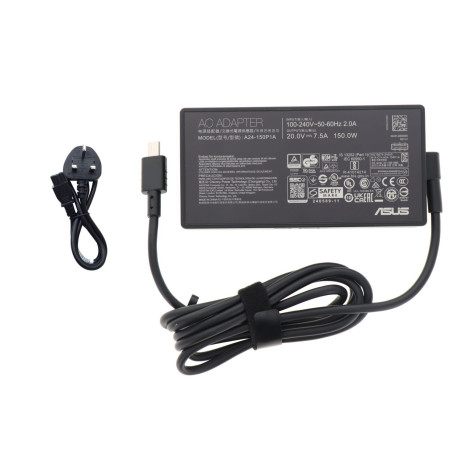
ASUS A24-150P1A · 150W AC Adapter
Output 20V ⎓ 7.5A · OEM spec · Rectangle DC-in · Best for gaming on AC
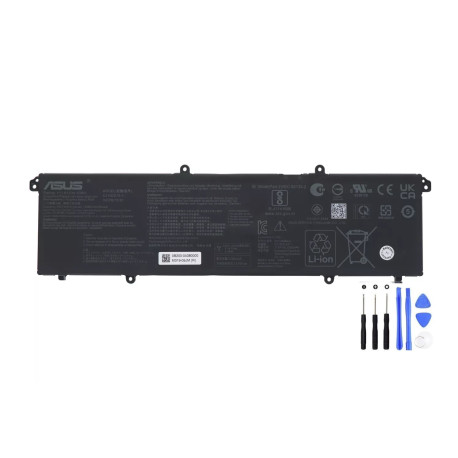
ASUS C31N2019-1 · 63Wh Original Battery
11.61V · 3-cell Li-ion · Genuine replacement for V16/VivoBook/ZenBook models
Soft tip: if you’re unsure which part fits, send your exact model (e.g., V3607VP) and a photo of your original adapter/battery label to the seller—they’ll confirm before shipping.