The HP Elite x360 1040 14-inch G11 2-in-1 Notebook PC is a premium business laptop designed for performance, portability, and long battery life. Like all laptops, however, its battery will eventually degrade with time and usage. In this article, we’ll cover the official battery specifications, common problems you might face, and solutions for extending the life of your device.
Official Battery Information
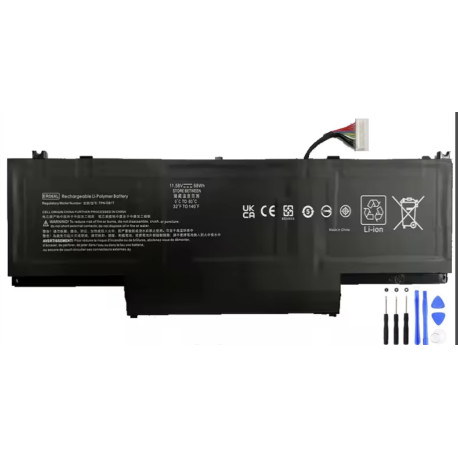
The HP Elite x360 1040 G11 series uses the following battery module:
-
Part Number: N59788-005
-
Model: SKO-BATT
-
Capacity: 6C, 68Wh, 2.94Ah
-
Battery Type: ER06XL ER06068XL-PL Li-ion
This high-capacity battery is designed to support long business hours, multitasking, and 2-in-1 convertible usage.
Compatible Product Numbers
The following HP Elite x360 1040 G11 product configurations are confirmed to use the N59788-005 (ER06068XL-PL) battery:
-
B8NK6UP – HP Elite x360 1040 G11 – WL Gore China
-
B7VB8EC – HP Elite x360 1040 G11 U7 16/256 GB
-
B86M0UP – HP Elite x360 1040 G11 – Sundt
-
AW3Y9EC – HP EB x360 1040 G11 – No NFC
-
B09XCEC – HP Elite x360 1040 G11 SureView
-
B18CZEC – HP Elite x360 1040 G11 IVG CN
-
A5RF3UA – HP Elite x360 1040 G11
-
A6UM7UP – HP Elite x360 1040 G11
-
A8WE6UP – HP Elite x360 1040 G11
-
A8ZZ7UP – HP Elite x360 1040 G11
-
A92D4UP – HP Elite x360 1040 G11
-
AB2J3US – HP Elite x360 1040 G11
-
AB2K1US – HP Elite x360 1040 G11
-
AF8A5UP – HP Elite x360 1040 G11
-
AF7D3UP – HP Elite x360 1040 G11
-
AK2A7US – HP Elite x360 1040 G11
-
… (and many more )
If your HP Elite x360 1040 G11 has one of the listed product numbers, the N59788-005 battery is the correct replacement part.
Common Battery Issues with the HP Elite x360 1040 G11
-
Battery Not Charging
-
The laptop shows “Plugged in, not charging.”
-
Solution: Update BIOS, check AC adapter, or replace with a new N59788-005 battery.
-
-
Battery Drains Too Quickly
-
Even after a full charge, runtime is significantly reduced.
-
Solution: Check Windows Battery Report, recalibrate, or replace the battery.
-
-
Overheating or Swollen Battery
-
Signs of battery swelling or unusual heat during charging.
-
Solution: Stop using immediately and replace with a genuine HP battery.
-
-
Battery Not Detected
-
BIOS or Windows cannot identify the battery.
-
Solution: Update system drivers and firmware, reseat the battery connector, or replace.
-
How to Replace the Battery
Replacing the HP Elite x360 1040 G11 battery requires some technical skill:
-
Power off the device and disconnect the charger.
-
Remove the back cover screws with a precision Torx screwdriver.
-
Gently open the chassis to access the internal battery.
-
Disconnect the old battery connector and remove it.
-
Install the new N59788-005 / ER06XLbattery.
-
Reconnect, reassemble, and test.
If you’re not comfortable doing this yourself, we recommend using an authorized HP service center.
Tips for Battery Care
-
Keep the charge level between 20%–80% when possible.
-
Avoid exposing the laptop to extreme heat.
-
Run BIOS battery calibration every few months.
-
Use the original HP charger to prevent voltage issues.
Final Thoughts
The HP Elite x360 1040 G11 is a powerful and versatile business laptop, but its performance is only as good as its battery. Knowing the correct battery part number (N59788-005, ER06XL ER06068XL-PL) and compatible models ensures you can replace it with confidence.
If your Elite x360 1040 G11 shows signs of battery failure, a replacement can restore its performance and extend its usable life.